Background
Public Key Infrastructure (PKI) is the key building block for many IT capabilities and has been around for a long time. It is poorly understood. Let's start by defining some key terms:PKI - Public key infrastructure (or standard x.509) defines the infrastructure, policies and usage of digital certificates.
 Digital Certificate - a digital file pair that allows us to implement capabilities like
- confidentiality - making sure data stays secret (at rest and in transit)
- integrity - making sure a message has not been tampered with in transit
- non-repudiation - making sure that a party is who they say they are
Certification Authority: A trusted computer that governs the policies, issuance, revocation and workflow of digital certificate operations. There are Root CAs, Intermediate CAs, and Registration Authorities. These roles (although NOT recommended) can be satisfied by a single system.
Certificate Policies: Define how a certificates is going to be used, issued, revoked, etc.
Certificate Revocation: When a certificate is revoked (e.g. user is disabled, or the computer role changes, certificate expires or is replaced), the revocation protocol is used. The legacy protocol is certificate revocation lists (CRLs), this has been replaced by the Online Certificate Status Protocol (OSCP).
PKI is all about the Trust Model and the standard as of how certificates are going to be handled. My advice is that standing a CA in an enterprise is a process that should not be taken lightly. The technology is the easy part.
For a great blog on PKI from the Microsoft PKI experts, go here: http://www.css-security.com/category/public-key-infrastructure/
Challenge: Managing the Lifecycle
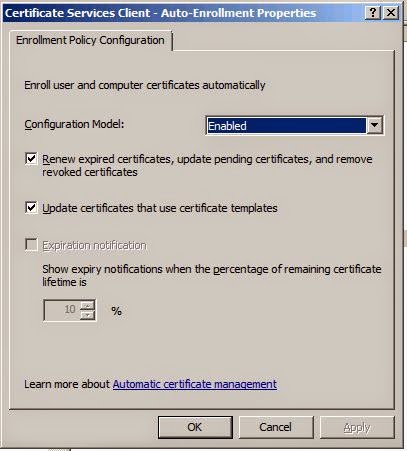
Once a PKI infrastructure is established, in a Windows environment the lifecycle of issuing, revoking, renewing and provisioning certificates is very simple: It can be done via self-service or with workflow, but we'll focus on the automatic method - using Group Policies.It's all about simplicity: The group policy client will check if either the user or computer needs a certificate, the PKI client will do the rest. If a computer belongs to an OU that has a GPO for PKI certificates, there's a usable certificate template and the right permissions are in place, the certificate will be issued and provisioned to the computer. Depending the policy, a few weeks before the certificate is revoked, the certificate will be renewed.
We already outlined these steps with the Mac platform.
adcert: Centrify's hidden gem
For any PKI expert, adcert is a gem. Why? The variability of UNIX and Linux platforms and the evolution of them have not produced several basic standards as of how certain things are going to be done. Since Centrify focuses in maximizing the investment in Active Directory with the Centrify Suite the answer is simple: Use the Microsoft CA.adcert is an Active Directory PKI client that works on Unix, Linux and Macs. It also can be combined with Group Policies so the lifecycle can be managed the same way as in Windows.
adcert must be run as root and it exists in /usr/share/centrifydc/sbin. Certificates (CRLs, are placed in the /var/centrify/net/certs folder.
Some key switches:
-e enroll certificates for this computer
-u <user> - retrieve the certificates for the user. In UNIX/Linux user GPOs are not enabled by default.
-m retrieve certificates for the computer. There has to be a usable certificate.
Example - to enroll the computer-based certificates for a computer:
$ dzdo /usr/share/centrifydc/sbin/adcert -e -m -V
Certificate AutoEnrollment for suse1$@CORP.CONTOSO.COM in domain CORP.CONTOSO.COM
Retrieved 17 templates with client or server authentication
Check template Administrator
Check template Centrify-Autoenroll
Check template Centrify-Autoenroll-Macs
autoenrollment is allowed
Check template ClientAuth
Check template DomainController
Check template DomainControllerAuthentication
Check template KerberosAuthentication
Check template MacAutoenroll
autoenrollment is allowed
Check template Machine
Check template OfflineRouter
Check template RASAndIASServer
Check template SmartcardLogon
Check template SmartcardUser
Check template User
Check template UserSignature
Check template WebServer
Check template Workstation
2 templates found with autoenrollment set
Checking certificate template Centrify-Autoenroll-Macs ...
certificate and private key exist on computer
revision (100) matches value in template
expiration is Mon Sep 21 13:00:58 2015 GMT
certificate public key matches private key
No OCSP url in AIA section of certificate.
ocsp operation not performed
certificate is valid
Checking certificate template MacAutoenroll ...
No issuing CA found for template MacAutoenroll.
No CA's found for all templates requiring new/updated certificates: [MacAutoenroll].
1/1 templates requiring a new certificate could not have one issued.
The only usable template is the one I set up for Mac Autoenrollment in a previous lab. The contents of the /var/centrify/net/certs shows:
$ ls -l
total 12
-r--r--r-- 1 root root 2069 2014-09-21 09:10 auto_Centrify-Autoenroll-Macs.cert
-r--r--r-- 1 root root 3357 2014-09-21 09:10 auto_Centrify-Autoenroll-Macs.chain
-r-------- 1 root root 1671 2014-09-21 09:10 auto_Centrify-Autoenroll-Macs.key
dzdo cat auto_Centrify-Autoenroll-Macs.cert
-----BEGIN CERTIFICATE-----
MIIFyjCCBLKgAwIBAgIKIiSOLwAAAAAAHDANBgkqhkiG9w0BAQUFADBaMRMwEQYK
CZImiZPyLGQBGRYDY29tMRcwFQYKCZImiZPyLGQBGRYHY29udG9zbzEUMBIGCgmS
JomT8ixkARkWBGNvcnAxFDASBgNVBAMTC2NvcnAtREMxLUNBMB4XDTE0MDkyMTEz
MDA1OFoXDTE1MDkyMTEzMDA1OFowITEfMB0GA1UEAxMWc3VzZTEuY29ycC5jb250
b3NvLmNvbTCCASIwDQYJKoZIhvcNAQEBBQADggEPADCCAQoCggEBANCZDHWJaHKR
Understanding the benefits
The key here is process consolidation and cost savings, especially for internal certs. The Microsoft root CA is trusted by all domain-joined computers, this means that Unix, Linux and Mac computers can easily participate in getting their own SSL, 802.1x, Code Signing and other types of certs; all with a single infrastructure and consolidated process. That is power.