Background
In the previous post "
What is a Kerberos Keytab and why should I use it?" we discussed that once you have a Centrified system, Kerberos-enabled applications can leverage this authentication mechanism. The key benefit being that the Centrify agent (adclient) automatically maintains the Kerberos environment (e.g machine keytabs and krb5.conf files are updated based on the AD sites and services info) and both the OS and Centrify offer an array of "Kerberized" apps to help the most seasoned Sysadmins.
In this post I will discuss some popular use cases:
- Using the Centrify DNS utility (addns) to leverage Active Directory DNS Dynamic Updates
- Eliminating cleartext passwords from the mount command or from /etc/fstab
Using AD DNS Dynamic Updates and addns to keep your DNS entries up to date
One of the coolest Centrify tools is addns. As discussed in an
earlier post, this utility can help in performing dynamic or manual updates to DNS registrations for Centrified systems. Think about the "ipconfig /registerdns" command on Windows. This is very useful especially when servers are being built with static IP addresses an in a Mixed UNIX/Linux and Windows environment.
How does it work?
As per
TechNet: "Domain Name System (DNS) client computers can use dynamic update to
register and dynamically update their resource records with a DNS server
whenever changes occur. This reduces the need for manual administration
of zone records, especially for clients that frequently move or change
locations and use Dynamic Host Configuration Protocol (DHCP) to obtain
an IP address.
Dynamic updates can be secure or nonsecure. DNS update security
is available only for zones that are integrated into Active Directory
Domain Services (AD DS). After you directory-integrate a zone, access
control list (ACL) editing features are available in DNS Manager so that
you can add or remove users or groups from the ACL for a specified zone
or resource record."
This means that in cases in which there are workstations (like Macs or Linux) that change networks frequently or when servers are being provisioned and there's no available Windows DNS administrator, addns can be a very useful tool.
The addns utility supports the -m (or --machine) switch, this means that instead of providing a valid AD account to update the DNS records for a computer, you can use the computer account's credentials instead. The key benefit here is that there's no need to type credentials.
[root@engcen7 ~]# cat /etc/redhat-release
CentOS Linux release 7.0.1406 (Core)
[root@engcen7 ~]# adinfo -v
adinfo (CentrifyDC 5.2.0-218)
[root@engcen7 ~]# addns -U -m
Updating host records for engcen7.centrifyimage.vms on 192.168.81.10.
Updated host records engcen7.centrifyimage.vms.
Updating reverse lookup records for engcen7.centrifyimage.vms on dc.centrifyimage.vms.
Updated reverse lookup record 167.81.168.192.in-addr.arpa.
Alternatively, if you know the credentials of an AD DNS administrator (or have a keytab), you can kinit and launch addns without the need to specify the --user (or -u) switch:
[root@engcen7 ~]# /usr/share/centrifydc/kerberos/bin/kinit dwirth
Password for dwirth@CENTRIFYIMAGE.VMS:
[root@engcen7 ~]# addns -U
Updating host records for engcen7.centrifyimage.vms on 192.168.81.10.
Updated host records engcen7.centrifyimage.vms.
Updating reverse lookup records for engcen7.centrifyimage.vms on dc.centrifyimage.vms.
Updated reverse lookup record 167.81.168.192.in-addr.arpa.
Potential Uses:
- Troubleshooting DNS connectivity for a roaming computer (Linux or Mac)
- Automated provisioning of IP addresses during Server provisioning.
Keep in mind, all the Centrify "ad" tools that take the -u (--user) option are Kerberized, including adjoin, adleave, addns, adcert, adsmb, adkeytab, etc; so your scripts don't require interactive attention or the use of cleartext passwords!
Eliminate Cleartext Passwords from the Mount Command or the filesystems table
The mount command traditionally lends itself for the use of cleartext passwords. Although Centrify has nothing to do with this command (there's a great degree of variability based on the distribution); the key continues to be Kerberos.
Let's pick on
this example. The idea is to use the mount command from a Unix or Linux system to mount a CIFS share that is on a NAS device or Windows Share.
Both the Mount Syntax
# mount -t cifs //ntserver/download -o username=vivek,password=myPassword /mnt/ntserver
and the fstab entry
//ntserver/docs /mnt/samba smbfs username=docsadm,password=D1Y4x9sw 0 0
specify the use of a cleartext password. Let's improve on this example by leveraging a Centrified system in the modified Microsoft Test Lab Guide. The idea is to leverage the AD Kerberos environment, the Centrify client, the machine account and the user account to eliminate the use of the cleartext password.
Using the Machine Account to access a Read-only Share
On APP1 - Assign permissions to the Unix/Linux system
- Open Windows Explorer and go to the root of the C: drive.
- Create a new folder and call it 'mysmb'
- Right-click the folder > Properties > Sharing > Advanced Sharing > Permissions and set:
Authenticated Users : Read
Domain Admins : Full Control

- Right-click the folder > Properties > Security > Edit > and Add
Select Type: Computers
CEN1$ (or your centrified system) : Read
Create a a text file in the folder (myfile.txt) and put some text in it.
On CEN1 (or your Centrified system) - Test your mount
Note: Make sure the cifs-utils package is installed on RHEL derivatives.
- Log on with a user that has the ability to elevate.
- Use the following command:
mount -t cifs //app1.corp.contoso.com/mysmb //mnt/share -o sec=krb5
- Test your share.
 |
| This mapping is done right without the need of cleartext passwords. |
 |
| The active session comes from the Linux computer. |
Because the mapping has been done with the Kerberos ticket of the machine account and typically per policy, these only last 10 hours; a mechanism to renew the ticket for the lifetime of the mount has to be implemented. For example, a cron job that renews the ticket before it expires like this:
Runs every day at midnight, 8AM and 4PM. This assures
there’s a fresh ticket every 8 hours.
# crontab -l
01 00 * * * /usr/share/centrifydc/kerberos/bin/kinit -k
cen1$
01 08 * * * /usr/share/centrifydc/kerberos/bin/kinit -k cen1$
01 16 * * * /usr/share/centrifydc/kerberos/bin/kinit -k cen1$
Or you can leverage the Set Crontab Entries GPO.
 |
| Crontab entries can be controled using Group Policy |
In addition, and in support of Hadoop, Centrify has come up with another set of GPOs to help with Kerberos ticket renewal. This parameter can be specified in the configuration file or via GPOs:
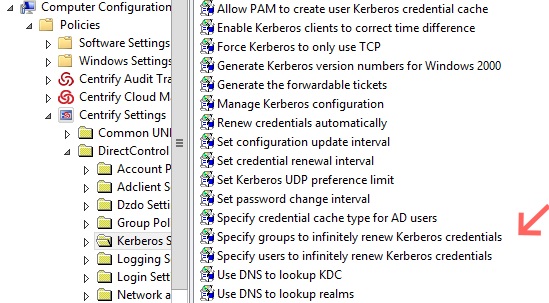 |
| Infinite ticket renewal GPOs |
This sets up the building blocks for our next entry. Leveraging UNIX-enabled AD groups to control access to a Windows share leveraging Centrify.


