Showing posts with label identity. Show all posts

Saturday, December 28, 2013

Basics: UNIX-Enabling Active Directory Users

Background

In a previous posting we discussed how UNIX systems identify users.
By default, UNIX/Linux systems using Centrify in Zone mode do not allow any user to log in to the systems unless they have:
  1. A UNIX Identity (login, UID/GID, Home, Shell and GECOS)
    This is what we call "UNIX-enabling" a user (hence the title of the posting)
  2. A role that allows the user to log-in.
UNIX-enabling simply means to provide a user (or a group) a UNIX identity in a Centrify Zone in Active Directory

Since we have established the Plan-Do-Check-Adjust model.  Here is the model for UNIX identities and Access

(Plan)ning UNIX Identities

  • Having a proper naming and identification strategy
    • What is the right login name?  Are there systems that don't like more than 8 characters?  (like HP-UX or AIX)
    • Does it have to be programmatically derived
    • What are the considerations for home directories?  Is there a central filer?
    • Is there an enterprise Shell?
    • Does anything need to be added to the GECOS field?
    • Are there different primary groups and secondary groups (other than private)?
  • What is the current state?
    • Is the namespace normalized(*)? Or does it need to be cleaned up?
      Are there users with different UIDs across systems?
      Are there different GID definitions for the same system?
      Are UNIX group memberships uniform?
    • Does the organization engage in Mergers and Acquisitions?
  • What will be the strategy if the company acquires another organization that has UNIX systems?
  • Are Samba or NFS in use?
(*) normalization is the process of rationalizing the names pase so everyone has a unique UNIX identity across the enterprise.  This is not a pre-requisite to deploy Centrify.

UNIX-enabling Users with Centrify (Do)

Users can get UNIX profiles using various methods:
  • Manually via Access Manager., Active Directory Users and Computers or ADSIEdit
  • Automatically via Centrify Zone Provisioning Agent
  • Automatically with any programming interface that can manipulate AD  (On Windows using vbscript, PowerShell, etc, and on UNIX/Linux using adedit).

Manual Method 1:  From Windows using Access Manager

  1. In Access Manager, expand the Zone, then UNIX Data, and right click Users.  
  2. Select Add Users to Zone
  3. In the Find box, type the name of the AD User account that is going to be enabled.  Select it and press OK
  4. Now, check all the boxes to pick the defaults OR, override each value to match your needs.

Manual Method 2:  From Windows using ADUC

Note: ADUC needs to have the Centrify Profile tab installed and activated
  1. In ADUC, right click the user object to UNIX-enable and select Properties
  2. Go to the Centrify Profile tab and select Add.  
  3. In the find window, press find and select the zone that the user will be added to.
  4. Follow the instructions from Step 3 above.

Manual Method 3:  From UNIX using adedit

Adedit is a TCL-based programming language included with the Centrify agent.
  1. On a Centrified UNIX system, type /usr/bin/adedit
  2. Bind to the domain with the proper credentials
    bind corp.contoso.com
  3. Select the zone to add the user to
    select_zone "cn=HQ,OU=Zones,OU=UNIX,dc=corp,dc=contoso,dc=com"
  4. Unix-enable the user
    new_zone_user jessie.matthews@corp.contoso.com
  5. Specify the UNIX identity
    set_zone_user_field uname jmatthews
    set_zone_user_field uid 0x8000000
    set_zone_user_field gid 0x8000000
    set_zone_user_field gecos "Jessie Matthews"
    set_zone_user_field home "%{home}/%{user}"
    set_zone_user_field shell "%{shell}"
    Note:  the 0x8000000 code after UID/GID specifies to use uniquely genereated code that is derive dfrom the AD object's SID.  Also, the variables under home and shell, allow this information to be picked based on the system's defaults.
  6. Verify the information
    show
    Bindings:
            corp.contoso.com: dc1.corp.contoso.com
    Current zone:
    CN=HQ,OU=Zones,OU=UNIX,DC=corp,DC=contoso,DC=com
    Current nss use:
    jessie.matthews@corp.contoso.com:jmatthews:1149240406:1149240406:Jessie Matthews:%{home}/%{user}:%{shell}:
  7. Save the Object
    save_zone_user

Manual Method 4:  From Windows using Centrify PowerShell

  1. On a Windows system with the Active Directory or Centrify PowerShell Modules
  2. Open PowerShell or PowerShell ISE as a user that has the rights to add and modify user profiles in the zone.
    Load these modules:
    Import-Module ActiveDirectory
    Import-Module Centrify.DirectControl.PowerShell
  3. Bind to the Centrify Zone in question
    $zone = Get-CdmZone -Name "HQ"
  4. Unix-enabling Jessie with defaults
    New-CdmUserProfile -Zone $zone –User jessie.matthews@corp.contoso.com -login jessie.matthews -UseAutoUid -AutoPrivateGroup –HomeDir "%{home}/%{user}" –Gecos "%{u:displayName}" –Shell "%{shell}"

Granting a UNIX Role

Once the user has an identity, the next step is to give him (or her) a role that grants them the ability to log in(*).  By this point a roles exercise has been conducted and the proper AD groups have been assigned UNIX roles.  This means that ADUC, Scripting/Programing, Identity Management Solutions and many other tools
(*) This is because users can be listed in a system, with no rights to log-in.

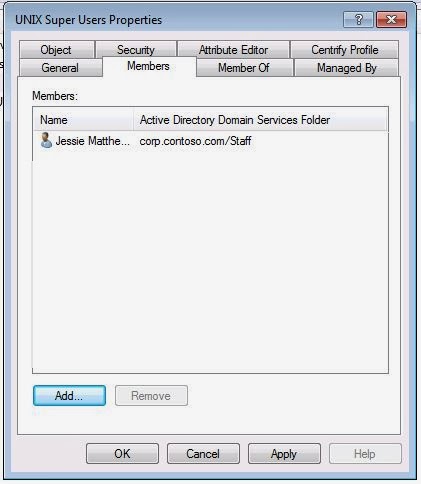
From Windows using ADUC
  1. Open ADUC and find the AD Group that has been assigned the role.
  2. Go to the Members tab and Click Add
  3. Find the newly UNIX-enabled user and Press OK Twice.
From UNIX Using adedit
  1. Log into UNIX/Linux with an account that can modify the group (or use kinit) and open adedit
  2. Bind to the domain
    >bind corp.contoso.com
  3. Add the ade_lib library
    >package require ade_lib
  4. Use the add_user_to_group function
    >add_user_to_group "jessie.matthews@corp.contoso.com" "UNIX Super Users@corp.contoso.com"
With PowerShell
Add-ADGroupMember "UNIX Super Users" -members "Jessie.Matthews"

At this point, when the cache refresh interval hits in the UNIX computer, the user will have the ability to log in with the corresponding role.


Verify the Access (Check)

There are multiple ways to check that the right identity and access have been provided:
  • In Windows:  via ADUC, Access Manager's User Effective Rights or Reporting
  • In UNIX with the adquery command and the dzinfo command.

To Verify the Identity in ADUC or Access Manager
  1. In ADUC, go to the user's properties, in the Centrify Profile tab, and double-click the entry.
  2. In Access manager, go to the Zone/UNIX Data/Users and double-click the user
  3. In any UNIX/Linux System in scope, run the adquery user <user name> command:
    $ adquery user jessie.matthews
    jessie.matthews:x:1149240406:1149240406:Jessie Matthews:/home/jessie.matthews:/bin/bash
To verify the level of access:
  1. In Access manager, go to the Zone/UNIX Data/Users and right-click the user and select "User Effective Rights"
  2. Select the system that you want to verify the level of access and review the settings.
Or
1. In Access Manager, go to the Reporting node.  Select the User's report or the UNIX User Effective Rights report, expand it, right click current and select Display Report

Review the systems that the user has access and what rights have been granted.
                                                                               Or 
In any System in scope, run the dzinfo <username> command.


(Adjust)ing the Identities or Roles assigned to a user

Due to various reasons there may be a need to adjust the user's identity or the role(s) that they may have in the systems.  Review the previous steps to perform any adjustments.  However, the most common operations are:
a) Identity Overrides:  This is when any of the default settings are modified.  E.g. they system admin does not want to change ownership of files and folders in multiple systems.  At this point he can change the UID/GID of the user to match their existing one.
b) Identity de-provisioning:  A user does not need access to UNIX systems anymore.  At this point their UNIX identity can be removed.
c) Access Changes:  A user may need to have access to more (or less systems) than required.  This may mean that they need to be added (or removed) from role assignments at the Computers Group level.
d) Temporary Access to a single or multiple systems:  These are normally exceptions. They can be dealt with temporary role assignments or computer level overrides.

Wednesday, December 11, 2013

Basics: Kerberos Super-Simplified

Cerberus the 3-headed dog


Kerberos is a protocol that leverages DNS, cryptography, a distributed client-server model, clients and time synchronization and ticket exchanges to provide secure authentication.

From a Security perspective, Kerberos resolves the following:
  • Enforces confidentiality because it makes sure that passwords are not in the clear over the network.
  • Protects integrity of the transaction by making sure that exchanges are not tampered with during transit
  • Provides high-availability (if properly implemented) by allowing for it to be deployed in a distributed fashion
For Kerberos to work,
  1. DNS name resolution needs to be working correctly
  2. There has to be a Directory Service to store service principal names (like LDAP) and service principals need to be registered in the proper attributes of the directory
  3. The Key Distribution Server needs to be available
  4.  Time between clients and servers can't be skewed more than 5 minutes (time servers have to be implemented)
  5. Client software needs to support Kerberos and the Kerberos environment has to be properly configured.
Active Directory can solve all these issues.  As a matter of fact, any Working windows network today (that has Windows 2000 and up) has a working Kerberos environment.  Kerberos is used by millions of people every day:

a) Bob signs into his Windows computer in the morning.
b) As he signs in successfully, a Ticket Granting Ticket (TGT) is issued for him with a duration of 10 hours.
c) When he opens his email (Outlook) and is able to start work on pending tasks.

Note: In a normal configuration he does not need to type-in his password again to open the program; because the "Kerberized client" (Outlook), the "Kerberized Server" (Microsoft Exchange), the Directory, Key Distribution Server, Policy Server and DNS server (the AD Domain Controller) take care of the rest.

Notice all the functions performed by Active Directory

Function
Provider
Provides name resolution
AD Domain Controller – DNS Service
Issues, validates tickets
AD Domain Controller - KDC
Provides encryption services
AD Domain Controller  - AES 256
Defines and enforces Kerberos policies
AD Domain Controller - Group Policy Engine
Directory Services
AD Domain Controller - LDAP
Provides time synchronization
AD Domain Controller - win32 time service
Provides high-availability and standard configuration
AD Domain Controller - replication
Kerberized Client
Windows 7, Microsoft Outlook
Kerberized Server
Microsoft Exchange


Notice the fragmentation on UNIX/Linux

Function
Provider
Provides name resolution
BIND
Issues, validates tickets
Kerberos KDCs (MIT or Heimdal)
Provides encryption services
LDAP (SSL or TLS)
Kerberos (for auth only)
Defines and enforces Kerberos policies
Configuration files
Directory Services
OpenLDAP  (& other packages)
Provides time synchronization
Network Time Service (NTP)
Provides high-availability
Multiple solutions:
-          LDAP Sync (for OpenLDAP)
-     BIND master/slaves
-          Kerberos Master/Slaves
-          Filers and export shares for configuration files
Kerberized Client
Many available, but not all support Kerberos
This is not important in the context of this conversation
Kerberized Server
Many available, but not all support Kerberos.
This is not important in the context of this conversation


Notice the variety of products, and now think:  What's in a capability?

People-Process-Technology

This example illustrates a phenomenon that plagues many organizations today:  IT Fragmentation.  For each of these solutions organizations require specialists (people), deviations in how things are done (process) and as you can see above, different solutions (Technology)

This is why, in my previous post, the IT manager is concerned about costs and organization agility.

Service Principal Names
SPNs are the "names" associated with a service.  The service (like a web server, host, file server, etc) executes in that security context.  Better definition here.

The syntax is: < service type >/< host name >:< port number >

In a practical sense, the meaning is this, if a service (let's say Apache, or httpd) wants to use Kerberos authentication, not only it has to be Kerberized, but the host of the service has to have an SPN for that service in the Directory service.  For example, for the host web.contoso.com, the http running on port TCP 8080 service's SPN is:  http/web.contoso.com:8080

Not specifying a port, basically assumes the default port.  In our example, port TCP 80.

Troubleshooting Kerberos

Troubleshooting Kerberos takes a lot of practice and will be revisited later, but here are a basic set of steps.  Just ask yourself:
  1. Is the service Kerberized?
  2. Is name resolution working?  Can DNS resolve by FQDN or short name?
  3. Is the time synchronized between the client, server and KDC (DC in AD)
  4. Are the correct SPNs registered  (remember that you can do short names and FQDNs)?
  5. Finally, the fact that you can authenticate, does not mean that you're authorized!!!

Tuesday, December 10, 2013

Basics: How users are identified in UNIX and in Active Directory

In UNIX:  UIDs and more...


UNIX users are identified in the system by their user identifier (UID for short), but a complete UNIX identity has more than that.  For a simple structure, it has stood the test of time:
  1. Login name:  this is basically the user account in understandeable format.  Login names are important subjects of planning, because in there are older versions of UNIX that don't like more than 8 characters in the login name.  
  2. UID:  user identifier or unique identifier.  This is the number that the OS assigns to files/folders,  processes for permissions, etc.  Typically UIDs from 0 to 100 are reserved.  The root account has UID 0.
  3. Group ID or GID:  This is the default group that the user belongs to.  In modern systems, there's a concept of the auto private group, this means that users by default belong to the GID that matches their UID.
  4. GECOS field:  Typically the description field.  For humans is just heir Display Name and other information like their phone extension. 
  5. Home Directory:  Location of the users's files.  Typically /home, or /exports/home or whatever the standardized location for users is.
  6. Shell (or login Shell):  The command interpreter for the end user.  This field also requires a bit of planning because not all shells may be installed in all systems.
User identity information in stand alone systems is stored in the /etc/passwd file.  The format is as follows:

Login name : Encrypted Password (deprecated) : UID : GID : GECOS : Home Path : Shell Path

Example:
login: Jim
UID/GID: 305
GECOS: James T Brown
Home: /home/jim
Shell: /bin/bash

jim:x:305:305:James T. Brown:/home/jim:/bin/bash

Ahhh simplicity!!!!

In Active Directory:  UPNs and more....


Active Directory does things a bit different, as an LDAP directory it uses a lot of X.500 legacy fields, but for the purposes of simplifying the process, here are the key fields:

Note:  When you create a user in AD, all you need to specify are the User logon name, either a name, last name or middle initial and a password.  However, it's a little bit more complex than this.  It will create these key fields:
  1. User Principal Name or UPN:  typically in the format of <user>@ad-domain-name 
  2. sAMAccountName: This is the account's short name (<20 characters)
  3. System Identifier:   In AD speak, the system identifier is called ObjectSID.  It contains the unique domain identifier, plus a globally unique identifier.

However, if you look at our user Jim, here's all the information that was added just by typing the default info:

Dn: CN=Jim Brown,OU=IT,OU=Staff,DC=contoso,DC=com
accountExpires: 9223372036854775807 (never);
badPasswordTime: 0 (never);
badPwdCount: 0;
cn: Jim Brown;
codePage: 0;
countryCode: 0;
displayName: Jim Brown;
distinguishedName: CN=Jim Brown,OU=IT,OU=Staff,DC=contoso,DC=com;
dSCorePropagationData: 0x0 = (  );
givenName: Jim;
instanceType: 0x4 = ( WRITE );
lastLogoff: 0 (never);
lastLogon: 0 (never);
logonCount: 0;
name: Jim Brown;
objectCategory: CN=Person,CN=Schema,CN=Configuration,DC=contoso,DC=com;
objectClass (4): top; person; organizationalPerson; user;
objectGUID: 6698f079-e870-43be-9c14-02260dfbafff;
objectSid: S-1-5-21-3571224596-3006733700-3057749774-1297;
primaryGroupID: 513 = ( GROUP_RID_USERS );
pwdLastSet: 12/10/2013 9:28:34 PM Eastern Standard Time;
sAMAccountName: james.brown;
sAMAccountType: 805306368 = ( NORMAL_USER_ACCOUNT );
sn: Brown;
userAccountControl: 0x200 = ( NORMAL_ACCOUNT );
userPrincipalName: james.brown@contoso.com;
uSNChanged: 282804;
uSNCreated: 282799;
whenChanged: 12/10/2013 9:28:34 PM Eastern Standard Time;
whenCreated: 12/10/2013 9:28:34 PM Eastern Standard Time;

Notice that there are significantly more fields created.  A lot of them are internal, others iexternal, like the DN. This is the x.500 format of the directory location of the object.  It says that the user object is in the Organizational Unit IT, under the OU Staff.
Depending on how the Active Directory schema has been modified, it's possible that more fields are added by default.  For example, on an AD that has been modified for Microsoft Exchange, depending on how things are set up, an e-mail address may be provisioned.   Notice that the e-mail address can be different (or the same) as the UserPrincipalName.

So what is a Schema then?

In the context of databases a schema simply specifieswhich attributes can be defined.  It's also known to old System Analysts like me like a Data Dictionary.  The best way to illustrate it is with an example.  
The white pages has a very simple schema:

Lastname, First Name
Address
Phone Number

Suppose that tomorrow a decision is made to include e-mail addresses in the  white pages.  The schema of the white pages has to be "extended" to accommodate e-mail address.  This means that we have to think

a) How many characters can we allow before the @ symbol?
b) Are we going to validate that the domain is valid?

All these decisions have impact on the size of the white pages database.  If tomorrow the White Pages team realizes that nobody will use their service to find email addresses, the database will have been extended and another project has to be initiated to eliminate this field.

In my previous post, I discussed that the Windows Administrator is worried about the use of proprietary schema extensions in AD, because the more schema extensions, the larger the AD database can be and if the product does not cut it, there's no way to go back in and remove those extensions.
In practical terms, there are two mitigating factors about the size concern:  the bandwidth in corporate networks and the database technology in AD  (Extensible Database Engine or ESE) that only replicates the deltas (but that's a topic for another post).
However, the concern is perfectly legitimate when it comes to proprietary extensions.  Can the solution guarantee success?

Centrify's Approach to UNIX Identities in Active Directory


The benefit of using Centrify is that it leverages schema extensions existing in AD since version 31 (Windows Server 2003 R2) specifically RFC 2307So do not worry Windows admins, no schema extensions required;  when you combine this with Centrify's proprietary Zones, System Administrators have a very flexible model that allows for a robust UNIX Identity Management model that can satisfy the needs of the most complex enterprises.
UNIX Profile properties for an end user in Centrify Access Manager

Basic Concepts: The Centrify Agent

Centrify's Active Directory Client
Typically known as DirectControl (or adclient) is Centrify's Active Directory integration service.  It leverages AD LDAP, Kerberos and Group Policy;  with over 10 years of maturity, the agent has evolved to support diverse platforms and has provides super user privilege management for UNIX/Linux and Windows platforms.


 The architecture of the client in UNIX is as follows:
  • NSS Module:  Uses the NSS facility to present AD as a source of of identity for users (passwd), and groups.
  • PAM Module:  The authentication against AD is implemented as a PAM module.  Centrify implements authentication, account, session and password modules.
  • Kerberos Libraries:  MIT Kerberos compiled libraries with support for Microsoft's Kerberos implementation.  The location of these tools is /usr/share/centrifydc/kerberos/bin.
  • Group Policy Engine:  Processes group policies from AD in the Unix/Linux and Mac platforms
  • Centrify-enhanced sudo:  A version of sudo that leverages Roles and Rights defined in AD with Centrify.
  • Command-line Tools:  Centrify has implemented command for the agent (ad commands), for privilege management (dz commands) and for auditing (da commands). In addition, there are modules for PowerShell for the DirectManage components, as well as an SDK.
  • LDAP and NIS Proxies:  These proxies present AD information to clients that can't have the agent installed (like filers, appliances, or legacy systems)
  • Offline credential cache:  Provides high-performance (by not requiring a persistent LDAP connections to AD) and high-availability (in case AD is not available or there's a network failure)
  • External Modules:  provides SSO facilities for Apache, Tomcat, Websphere, Weblogic Java2EE application servers, SAP (GUI and Netweaver) and DB2
  • Watchdog Process:  provides a backup mechanism for recovery and diagnostics in the case of a daemon failure.

Communicating with Active Directory

To talk to domain controllers, the Centrify agent uses the following communication ports:

Port
Description
TCP/UDP 389
LDAP
TCP 3268
Global Catalog Search
TCP 88
Kerberos TGT
TCP 464
Kerberos password changes (passwd, adpasswd)
UDP123
Optional: Network Time Protocol (NTP)(*)
TCP 53
DNS query for A and SRV records
TCP 445
Optional:  SMB to read Group Policies
Ephemeral Ports
Required for communication

Communications between the Centrify client are mutually authenticated and encrypted, just like when Windows clients communicate with DCs.

For more information, see this Technet article.

(*) By default, the Centrify AD client will make UNIX, Linux or Mac sync time with Active Directory Domain Controllers;  you can use any NTP service, however you need to make sure that it's within 5 minutes from the DC (that acts as a Kerberos KDC).  This is a Kerberos requirement to protect against replay attacks.