Showing posts with label adflush. Show all posts

Monday, June 23, 2014

Troubleshooting: Ruling-out issues with the user's AD Account

Verifying that the user's AD account is OK

To verify that the user's account is OK you'll need access to any of these tools:

  • Active Directory Users and Computers
  • Centrify Access Manager
  • The Unix/Linux command line of a Centrified system

You MUST know how provisioning happens in your organization.  Otherwise you're trying to troubleshoot something that you DON'T understand.  How smart is that?

What you're looking for to rule out issues with the AD account

The user account has to be enabled, not locked, not expired, if it has restrictions (logon hours/logon to) those must make sense, they need a Unix Identity (login, uid, gid, etc.) and to belong to the right group if you are granting roles based on group membership.

From Windows with Active Directory Users and Computers

The account tab of the AD user contains most of the relevant info.
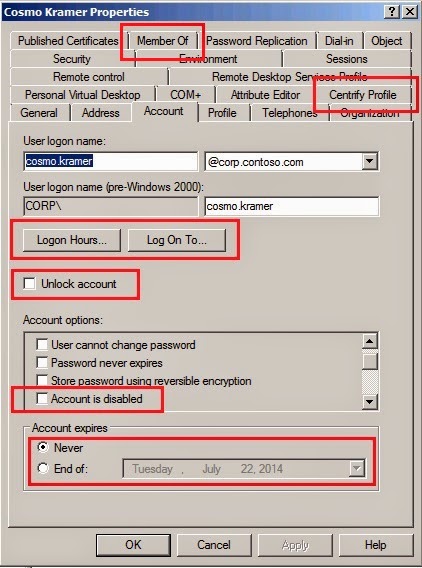

The Centirfy Profile tab can expose the user's UNIX identities.

Finally, the "member of" tab can expose the groups the user belongs to.  If any of the groups is used for the purposes of role-based access.  I know to look in here because I understand the process.


From Windows using Centrify Access Manager 

Determining if the user has an identity

Under the Zone/Unix Data/Users node, you can see a list of users.  Double-click the user to see the identity. If the user is not on the list, you may be facing time issues or provisioning issues.

Determining if the user has a role
The "Show Effective UNIX rights" utility is the best tool to determine who has access to which system and at which level.  Just right lick the zone or system and select the function.


From Unix/Linux using CLI tools
You can use the adquery user <user> with the -A switch.  Depending on how it is run, it may produce different results.  If elevated (with dzdo in this case) provides all the information required about the account.
This output tells me that the user has a Unix Identity (because unixname, uid, gid, etc are present), the account is neither expired nor locked, and judging from the output of dzinfo, the user does have a role that allows him to log in and even some privileged commands.

Compare with this output. Here I deprovisioned the user, note the output of a simple adquery user <user> that states that the user is not a zone user.  In this case the user is missing the UNIX identity, so we used the AD user logon name to get the information about the user with the -A switch.
This looks like a good AD account that does not have a Unix Identity. 

Let's put all this together in this video:


Using Switch User (su) or Kerberos tools
If you have a privileged account, switch user (su) can be used to isolate a particular application (like SSH) from a troubleshooting situation.  Assuming the user does have an identity and a role, but can't log in via SSH, you can try to elevate.

george@cen1 ~]$ dzdo su cosmo
AD Password:
Created home directory
[cosmo@cen1 george]$ id
uid=1149240408(cosmo) gid=1149240408(cosmo) groups=1149240408(cosmo),10024(webadmin) context=unconfined_u:unconfined_r:unconfined_t:s0-s0:c0.c1023
[cosmo@cen1 george]$

In this sequence, George elevated with Centrify sudo to switch to Kramer. If Kramer is having issues with SSH login, this eliminates his Centrify identity and role from the troubleshooting table.

If you want to take things further and eliminate both the logon application (that may use PAM) and NSS and test the AD account directly, you can use kinit and klist from  /usr/share/centrifydc/kerberos/bin.

[george@cen1 ~]$ /usr/share/centrifydc/kerberos/bin/kinit cosmo.kramer
Password for cosmo.kramer@CORP.CONTOSO.COM:
[george@cen1 ~]$ /usr/share/centrifydc/kerberos/bin/klist
Ticket cache: FILE:/tmp/krb5cc_cdc1149240406_EINhqm
Default principal: cosmo.kramer@CORP.CONTOSO.COM

Valid starting     Expires            Service principal
06/22/14 14:11:36  06/23/14 00:11:40  krbtgt/CORP.CONTOSO.COM@CORP.CONTOSO.COM
        renew until 06/23/14 14:11:36

I would argue that using kinit/klist are the fastest way to determine if any AD account (if the credentials are known) is working correctly. It also ensures that the communication path between the Centrify agent and AD is working as expected. Notice that I did not use the user's unix name (cosmo) but their AD account (cosmo.kramer).

In the next posting, we'll continue our troubleshooting and will look at what happens in the logs.

Troubleshooting: Understanding How Time Affects When Changes are Effective

The best way to summarize how time works in an AD environment that leverages Centrify agents for Unix, Linux and Mac OS X is to look at this formula:

Effective Changes = Σ(Provisioning, AD Replication, Cache Flush Interval)

Changes are additions, deletions or modifications of AD objects (LDAP).  This excludes real-time Kerberos transactions like authentication or password changes.

Provisioning


In Centrify for Unix/Linux, we call provisioning the action of assigning an existing AD principal (user or group) a UNIX identity (login,UID,GID,Home,GECOS,Shell).  In the case of users they also need a role to be able to log into systems; both actions can happen manually or automatically (via an Identity Management Solution that leverages the Centrify APIs, via the  Zone Provisioning Agent utility, or programmatically via Centrify PowerShell or Centrify adedit).
For example, in my environment I use ZPA and I assign the roles to AD groups so the management is simplified.  I've also nested my role-granting-group into the provisioning group.  This means that my modified equation is:

Effective Changes @ Contoso = AD Replication of Group Membership + ZPA Polling Interval + AD Replication of ZPA Provisioning + Cache Flush Interval)

Notice how my provisioning design has an impact on time.  I have potentially two actions that require AD replication and an agent that I've set up to poll every 15 minutes.


This means that a provisioning action can take as long as 15:30 from a provisioning + AD perspective in an intra-site scenario assuming (in the case of a user) that both the identity and the role were granted at the same time.

AD Replication

If you're relatively new to Active Directory and don't have an idea on how AD replication works, read these links and come back:

Basic Concepts: http://technet.microsoft.com/en-us/library/cc731537%28v=ws.10%29.aspx
How it works:  http://technet.microsoft.com/en-us/library/cc772726(v=ws.10).aspx 

In case you did not read the links above, the basic problem is that when you have a replicated database changes take time to propagate.  AD Sites (fast connected subnets) have internal (intra-site, shorter) and external (inter-site, longer) replication periods.

Intra-site replication is somewhat predictable.  A DC will notify to its nearest partner of a change within 15 seconds and this will cascade within a site.  Older versions (like Windows 2000) were set at 5 minutes.

Unfortunately in larger global environments AD inter-site replication times vary. It all depends how the AD team has tuned the environment based on the inter-network topology.   This is why to be an effective Centrify administrator you need to be in constant communication with your AD team. Replication affects availability for users and definitely affects your SLAs.  The best solution at a higher level is to use Microsoft's recommendations for AD replication in large environments and that they maintain current Subnet, Site and Domain Controller information.  This is very important.


That being said, there are things that you can do to make sure things happen faster. 
For example, if there is a new add/move or change and the target is a key server in a specific location, you can log into the server and find out what domain controller the server is currently talking to with the adinfo command (or adinfo --server).  If you're making the provisioning via ADUC, adedit or Access Manager, make sure you're talking to the same DC.  At that point you basically have eliminated AD time from the equation and you can issue an adflush when these changes are made.


If you're using The Windows PowerShell Centrify commandlets, you can use the echo %logonserver% command in a windows prompt to find out which domain controller you're currently talking to.

Centrify Agent Cache

We've talked about the cache in previous posts;  however, all you need to know that to improve performance and to provide high-availability the Centrify agent for Unix, Linux and Mac does not bother AD persistently to ask for changes;  this happens by default every hour.

Putting it all together

Looking back at my example, this means that in an intra-site scenario with two domain controllers like in my lab contoso environment, the length of time for an effective for a user change can be as long as 65:30 minutes. Because it takes up to 15 seconds for replication to happen on the provisioning/role granting action, up to 15 minutes for ZPA to poll, 15 additional seconds for the ZPA change to propagate and up to 60 minutes for a Centrified system to update its cache.

How to perform manual add/moves/changes in an effective matter

  1. Determine the key system, and issue an adinfo command to determine the domain controller the agent is talking to.  (adinfo --server)
  2. With that information, connect your ADUC or Access Manager consoles to the target DC.  (on AM, use the "Connect to remote forest" option; on ADUC use the "Change Domain Controller" option).
  3. Perform your changes in AD (add/moves/changes)
  4. Perform an adflush in the target system  (if it's a local override, you need to restart the agent)
  5. Verify the changes with adquery, dzinfo, etc.
Note:  Flushing the cache (by interval or manual with adflush) is an expensive operation, I recommend that you keep the default cache flush interval of 3600 seconds (one hour) and try to establish a proper Service Level Agreement for these operations.

Sunday, June 22, 2014

Troubleshooting: My brand new users aren't available or can't log in

Background

This is probably the most common task to troubleshoot is user's availability in a system.  Granting access to a brand new user (or users) to a system.  The user may or may not be available to the system or can't log in.
In this initial article, we will cover the mechanisms to minimize replication and techniques on how to rule out issues with the user's AD account.

What you've probably done so far:
  1. You set up a Centrify zone or child zone with the corresponding user and group defaults
  2. You've configured authorization (computer roles, UNIX rights, roles and role assignments)
  3. Installed the Centrify agent and joined one or two Unix or Linux systems
  4. You're trying to test a user or two but have no luck
Symptoms:
Unfortunately, your user does not show up in the system (adquery user does not show the user or users), possibly the user shows up, but can't log in;  Maybe the user shows up and can log on after a long time (undetermined time).

Remember:
By default in zone mode (unlike in Express mode) no users have access to the Unix, Linux (or Windows) systems that belong to the zone.  

Troubleshooting Checklist
We can use a two-category technique to troubleshoot this issue.  We can divide it into time and configuration items.  Time can be proactively managed and configurations can be verified and ruled out.
  • Enough time should have passed for
    • Any Identity Management tool to work (IdM solution, ZPA or program)
    • AD replication to complete
    • The cache flush interval complete (or the adflush command issued in a target system)
  • In order to access a Unix/Linux system, a user needs an identity and a role
    • To get an identity: the AD user has to be added to the zone to get a login, UID, GID, GECOS, Home and Shell based on the zone defaults to get an identity
    • To get a role:  the role has to be assigned to a user directly or to a group that the user is a member of.
  • The role needs to have at least the intended PAM logon right for the user to be allowed to log in.
  • The role assignment has to be properly scoped (Zone, Child Zone, Computer Role or System level)
  • The role has to be properly created:  logon options, hours, auditing, etc.
  • The user's AD account should not be subject to any restrictions (logon, computer)
  • The user's AD account should be usable (not expired, disabled or locked)
  • The user is not listed in the /etc/centrifydc/user.ignore file
  • The user principal has to be readable on the correct side of the one-way trust

Where to go now?