Background
Active Directory trusts are a broad topic and we typically have conversations with UNIX, Linux or Mac SMEs are excited about Centrify capabilities, but don't understand the purpose of trusts.As a matter of fact, sometimes even the AD SMEs don’t understand the types of trusts in their own environment; this has the makings for interesting conversations.
The purpose of this blog post is to provide a primer on AD trusts (mostly by way of references) and to cover the considerations of Centrify deployments on the most popular type of trust: The external forest one-way trust.
I think that especially now that I see a lot of organizations extend their AD infrastructure to IaaS (like Amazon, Azure, Rackspace, etc) it's very important to know how these trusts work and what are the considerations to their Centrified systems.
What you need to know to understand this article
You must understand Active Directory basic concepts like forest, domain, sites, domain controllers, global catalog, DNS, and network connectivity. A quick search should yield some interesting results; you can also look at my personal blog.
My next advice will be to read about trusts and how authentication works with them, but this can be a very long and deep read. The best article about how trusts work is this one:
https://technet.microsoft.com/en-us/library/cc773178%28v=ws.10%29.aspx
Continue reading, and keep in mind, the main object of this article is to help UNIX, Linux and Mac OS X Centrify administrators get a basic understanding of external one-way trusts plus key-in on considerations for their Centrify deployments.
Needless to say, if you're supporting Centrify you need to know the basics like Zones, DirectControl, DirectAuthorize, Access Manager, Centrify PowerShell, etc.
Basics
Why Active Directory trusts exist?There are several reasons, some of them are backward-compatibility, support for Kerberos realms, etc., however the most common reason is to support the account-resource model.
What is the account-resource model?
It's a security model in which user and group accounts exist in a centralized realm and resources (systems, apps, files, etc) exist on a different realm.

Notice the direction of trust, vs. the direction of access. Believe it or not, if you understand the concept outlined in this illustration, you will get one-way trusts with ease.
Note: The account-resource model is just one reason why AD trusts exist. The key reason is the modern enterprise; Global companies need ways to accommodate different access models especially when mergers and acquisitions happen too. Since the modern enterprise is changing to expand the barriers of the datacenter, more capabilities will be created to support these scenarios. AD one-way trusts, RODCs, etc are just some of the tools of the trade.
Other facts about Active Directory Trusts:
- There are different types of trusts: External, Real, Forest, Shortcut
- Trusts have transitivity: non-transitive, transitive
- Trusts have direction: one-way, two-way
- Trusts have scope: trusts may allow domain-wide or selective authentication
A reference model to understand External one-way trusts

The layers are: TCP/IP (network communications), name resolution, active directory and Centrify layer. The idea is that the model mimics the OSI model, in which if a lower layer fails, the upper layers won't work either.
TCP/IP Layer
There are different communications requirements for things to
work as expected, but we need to concentrate first in what kind of traffic we
will be dealing with.
The considerations for communications are very important
especially in DMZ scenarios; the key
here is that most likely there’s conversations between 3 different
subject-matter-experts: the UNIX, Linux,
Mac SME, the AD SME and the Network/Firewall SME.
- Traffic between forests to establish the trust relationship in the first place (not in scope for this article, but read the Network Ports used by Trusts section of this link.
- Traffic between the Centrify AD client and its local domain controllers
- Traffic between the Centrify AD client and remote domain controllers (from the trusted domain) for referrals (see below in the AD layer)
- Traffic between systems with AD tools and Centrify tools for referrals and the object picker (see below in the AD layer)
- If DirectAudit is in use: Traffic between the audit agent and the collector and between the collector and the database and management server. <= this will be discussed later
- If DirectSecure is in use, GPO traffic to obtain PKI certificate auto-enrollment and IPSec rules implies connectivity between domain controllers (to get GPOs) and CAs or SubCAs to get the certificates themselves. <= this will be discussed later
The ports required for AD communication can be determined
very quickly with DirectControl, (just run the “adinfo –T” command) but here’s a summary:
- TCP 53 (DNS) - without name resolution there’s no communication. Period. This means that A and SRV records must be resolvable by all systems on each side of the trust relationship.
- TCP 3268 (Global Catalog): In AD, a domain controller with the Global Catalog role contains a partial replica of all objects in AD. Global Catalog placement has performance implications.
- TCP and UDP 389 (LDAP): This should be self-explanatory.
- TCP 445 (modern Server Message Block): This is optional, but required for GPOs used for config management.
- TCP 88 (Kerberos KDC): Self-explanatory; this the port for Kerberos communications.
- TCP 464 (Kerberos password change): This is the port for password change operations
- TCP 123 (SNTP): This is optional, to sync time with the domain controller’s Windows Time Service.
- Ephemeral ports(*): These are often overlooked, but these are the high-ports used for socket communications.
(*)Note: Microsoft has changed the ephemeral port range over
the years and the best way to see the ones that apply to your version of
Windows is to look at the output of the netsh command with some options:
C:\Windows\system32>netsh
int ipv4 show dynamicport tcp
Protocol tcp Dynamic
Port Range
---------------------------------
Start Port : 49152
Number of Ports :
16384
Bottom-line: Expect
to allow communications from Centrified systems and management stations to at
least two domain controllers from your trusted forest.
These can be read-only DCs
(RODCs) and depending on forest complexity, these may have to be Global
Catalog.
This is not an issue on flat networks, but definitely more
complex high-security scenarios like DMZs.


In the illustration above, this is a post-trust
establishment scenario with one RODC in the trusting side and a firewall only
allowing traffic for the RODC to be updated by the trusted domain DCs.
Both referral traffic from Centrified systems and management
stations are serviced by the RODC.
Note: This is just one way of going about this scenario, there are several ways with pros and cons.
Note: This is just one way of going about this scenario, there are several ways with pros and cons.
Name Resolution Layer
Name resolution by way of DNS is often overlooked by many administrators, the key to understand here is that Active Directory clients use Kerberos for authentication and in a "Kerberized" world there’s no functionality without being able to resolve names; DNS symmetry is key; fortunately most AD deployments use domain
controllers as DNS servers, but in scenarios in which other DNS servers are
used, DNS Zones holding AD SRV records have to be accessible.
In my demo environment, I used the “conditional forwarding”
capabilities of Windows DNS.

Note that I can get away with
this because my network is flat. If I
was dealing with a DMZ scenario I would either host a replica and protect it
with firewall rules or IPSec encryption for DNS traffic.
For legacy apps, careful thought must be given to short
names, especially watch out for duplicity or short names exceeding 15 characters. Read the best practices for naming in Active
Directory.
In addition there's the issue of Kerberos realms vs DNS Names: with active directory these are often the
same, but it does not have to be like that.
Active Directory Layer
The AD layer deals with all the Active Directory-related
capabilities needed for the trust to work as expected and these include trusts,
referrals, object picking, authorization
and group scoping
Trusts
Because this topic focuses on the external non-transitive one-way
trust, it’s important to know it may be selective; but to keep things simple,
let’s assume it’s a domain-wide trust.

If Fabrikam (HQ) trusts Contoso (CORP), that means that
users from the corp.contoso.com can access resources from hq.fabrikam.com;
Trusts are set up with a dual authorization (just like
launching a rocket). If you look at
Active Directory Domains and Trusts for both sides you’ll see this:
The non-transitivity of the trust is what provides the assurance that accounts from the trusting domain won’t be able to access resources from the trusted domain.

The non-transitivity of the trust is what provides the assurance that accounts from the trusting domain won’t be able to access resources from the trusted domain.

Authorization
We have talked about authentication in most of this entry,
but we haven’t addressed authorization.
Going back to the basic principle of the example:
"If hq.fabrikam.com trusts corp.contoso.com, that means that users from the corp.contoso.com can access resources from hq.fabrikam.com"
"If hq.fabrikam.com trusts corp.contoso.com, that means that users from the corp.contoso.com can access resources from hq.fabrikam.com"
HOWEVER, this does not mean that users from corp.contoso.com have any privileges on hq.fabrikam.com; this will only happen if it’s explicitly granted.
The common practice in a centralized account-resource model
is to add the Global Domain Administrators group from the trusted domain into the Builtin Local Administrators group from the
trusting domain, this will allow for
Centralized administration, and since there’s really no accounts used by users
in the resource domains (other than contingency or service accounts), the
unique credential principle is maintained.

This has implications to the Centrify best practices and
we’ll discuss this on the Centrify layer.
Group Scoping
A key concept in the access model is group scoping. In a nutshell it means that security groups
(the groups used for authorization) have different scopes: Universal, Global and Domain Local.
The key here is that Domain Local groups can contain
principals (users/global groups) from the local domain and any trusted
domain. Global groups can only contain
principals from the same domain.
For the sake of simplicity I will ignore Universal groups. Please see this
article for an in depth comparison.
The best practice is to Assign Rights (or entitlements) to
Domain Local Groups and add users or Global Groups to the Domain Local
group. From that point on, the
add/moves/changes of rights and entitlements are managed via group memberships.
See the example above:
The Domain Local Administrators group from hq.fabrikam.com contains the
Global groups from corp.contoso.com and hq.fabrikam.com and the local
Administrator domain account.
Referrals
I’ve mentioned referrals before in this topic.
A referral happens when a system from the trusting domain
has to authenticate a user from the trusted domain. Let’s look at an oversimplified example:
- If the system centos66 in hq.fabrikam.com needs to authenticate user joe@hq.fabrikam.com, the authentication will happen locally against the fab-dc1.hq.fabrikam.com domain controller.
- If the system centos66 in hq.fabrikam.com needs to authenticate user jerry@corp.contoso.com, provided that the user has a UNIX identity and a role that allows login, the authentication will be referred to dc1.corp.contoso.com to satisfy the request.
The same thing happens with Windows systems or tools like
ADUC, Access Manager, PowerShell, etc.
For more information, please read the “Kerberos-Based
Processing of Authentication Requests Over Forest Trusts” section of
this link.
Object Picker
When using tools like Active Directory users and computers
or Access Manager, in order to pick
foreign principals you use the object picker.
Here’s an example below:

This screenshot is from Access Manager running from the
trusting forest (hq.fabrikam.com) and
corp.contoso.com is the trusted external forest.
This means that in this case, the Access Manager console
must have at least 2 layers (communication and
name resolution) in order to get to this point;
Note: The fact that we can get there does not mean that we can browse the trusted forest, we must have a valid AD account from that forest. Remember, we are going against the direction of access.
Note: The fact that we can get there does not mean that we can browse the trusted forest, we must have a valid AD account from that forest. Remember, we are going against the direction of access.

This screenshot is from Access Manager running from the
trusted domain (corp.contoso.com) notice that you can’t even pick from the trusting domain (hq.fabrikam.com) because
of the fundamental way trusts.
Principals from the trusting forest can’t access resources in the
trusted forest.
This sounds like a broken record, but believe it or not,
this is the main source of confusion for the IT leads we work with.
Centrify Layer
This layer covers the behavior of Centrified systems when an
external one-way trust is established, management tools, and how the best
practices change in the account-resource model.
Verifying TCP/IP
Connectivity using Centrify CLI Tools
Like I explained before, the adinfo –T command will be very
handy. Let’s look at the output of this
command from two perspectives:
corp.contoso.com (trusted)
|
hq.fabrikam.com (trusting)
|
[george@cen1 ~]$
adinfo -T && adinfo -T hq.fabrikam.com
Domain
Diagnostics:
Domain: corp.contoso.com
DNS query for:
_ldap._tcp.corp.contoso.com
DNS query for: _gc._tcp.corp.contoso.com
Testing Active Directory connectivity:
Global Catalog: dc1.corp.contoso.com
gc: 3268/tcp - good
Domain Controller: dc1.corp.contoso.com
ldap: 389/tcp - good
ldap: 389/udp - good
smb: 445/tcp - good
kdc: 88/tcp - good
kpasswd: 464/tcp - good
ntp: 123/udp - good
Domain
Diagnostics:
Domain: hq.fabrikam.com
DNS query for: _ldap._tcp.hq.fabrikam.com
DNS query for: _gc._tcp.hq.fabrikam.com
Testing Active Directory connectivity:
Global Catalog: fab-dc1.hq.fabrikam.com
gc: 3268/tcp - good
Domain Controller:
fab-dc1.hq.fabrikam.com
ldap: 389/tcp - good
ldap: 389/udp - good
smb: 445/tcp - good
kdc: 88/tcp - good
kpasswd: 464/tcp - good
ntp: 123/udp - good
|
[rpimentel@centos66
~]$ adinfo -T && adinfo -T corp.contoso.com
Domain
Diagnostics:
Domain: hq.fabrikam.com
DNS query for: _ldap._tcp.hq.fabrikam.com
DNS query for: _gc._tcp.hq.fabrikam.com
Testing Active Directory connectivity:
Global Catalog: fab-dc1.hq.fabrikam.com
gc: 3268/tcp - good
Domain Controller:
fab-dc1.hq.fabrikam.com
ldap: 389/tcp - good
ldap: 389/udp - good
smb: 445/tcp - good
kdc: 88/tcp - good
kpasswd: 464/tcp - good
ntp: 123/udp - good
Domain
Diagnostics:
Domain: corp.contoso.com
DNS query for:
_ldap._tcp.corp.contoso.com
DNS query for: _gc._tcp.corp.contoso.com
Testing Active Directory connectivity:
Global Catalog: dc1.corp.contoso.com
gc: 3268/tcp - good
Domain Controller: dc1.corp.contoso.com
ldap: 389/tcp - good
ldap:
389/udp - good
smb: 445/tcp - good
kdc: 88/tcp - good
kpasswd: 464/tcp - good
ntp: 123/udp - good
|
This confirms that Centrified systems in Fabrikam will have
no issues with queries or referral traffic.
Centrify Agents and
Trusts
On startup, join, forced cache expiration or when the 8-hour
domain discovery threshold is met, the Centrify agent interrogates domain
controllers and if required, it will update its Domain Map.
A key command to review the domain map is the “adinfo
--sysinfo domain”; let’s look at the output from both sides
corp.contoso.com (trusted)
|
hq.fabrikam.com (trusting)
|
$ dzdo adinfo
--sysinfo domain
AD Password:
System Diagnostic
========Domain
info map========
DC=corp,DC=contoso,DC=com
CN = CORP.CONTOSO.COM
SID = S-1-5-21-2180375406-786980114-1643973036
TRUST_ATTRS = 0x20
TRUST_DIRECTION = 3
TRUST_TYPE = 2
NTLM NAME = CORP
LOCAL FOREST = YES
CN=hq.fabrikam.com,CN=System,DC=corp,DC=contoso,DC=com
CN = HQ.FABRIKAM.COM
SID =
S-1-5-21-2165579280-668341325-710928106
TRUST_ATTRS = 0x0
TRUST_DIRECTION = 1
TRUST_TYPE = 2
NTLM NAME = HQ
LOCAL FOREST = NO
|
$ adinfo --sysinfo
domain
System Diagnostic
========Domain
info map========
DC=hq,DC=fabrikam,DC=com
CN = HQ.FABRIKAM.COM
SID =
S-1-5-21-2165579280-668341325-710928106
TRUST_ATTRS = 0x20
TRUST_DIRECTION = 3
TRUST_TYPE = 2
NTLM NAME = HQ
LOCAL FOREST = YES
CN=corp.contoso.com,CN=System,DC=hq,DC=fabrikam,DC=com
CN = CORP.CONTOSO.COM
SID =
S-1-5-21-2180375406-786980114-1643973036
TRUST_ATTRS = 0x4
TRUST_DIRECTION = 2
TRUST_TYPE = 2
NTLM NAME = CORP
LOCAL FOREST = NO
|
The key fields here are the trust type and trust
direction. Direction 3 means two-way
(always with the local domain),
Direction 2 means one-way;
Workstation Mode vs.
Zone Mode
In my test environment in the trusting (resource) domain
(hq.fabrikam.com) I have two systems:
- A CentOS 7 system joined in workstation mode called cen2
- A CentOS 6.6 system joined in zone mode called centos66
Workstation mode (Auto zone) won't work in a 1-way trust scenario.
The reason has to do with the way AZ generates UNIX identities. The
UID/GID parts of the UNIX identity are generated on the fly based on the
user or group's Active Directory SID (unique identifier), however since
the system is in a resource forest, based on the security model it
can't even read the object's SID. The alternative is to use Centrify
Zones.

Note: AutoZone will work over a transitive 2-way trust.
In Zone mode, only authorized users from the local and trusted forests that that have been UNIX-enabled will have access to the system. When you use Access Manager and use the object picker to select an object from the account domain, you must do so with a authenticated user from the trusted domain, at that point our software can see the user/group information and will create the proper identity information in the zone.
Note: AutoZone will work over a transitive 2-way trust.
In Zone mode, only authorized users from the local and trusted forests that that have been UNIX-enabled will have access to the system. When you use Access Manager and use the object picker to select an object from the account domain, you must do so with a authenticated user from the trusted domain, at that point our software can see the user/group information and will create the proper identity information in the zone.

Note the red arrow next to Jerry’s name. This indicates a foreign principal.
$ adquery user -P
felderi.cibao@hq.fabrikam.com
jerry.seinfeld@corp.contoso.com
rpimentel@hq.fabrikam.com
And the UNIX identity is defined as per the zone settings:
$ adquery user -A
jerry
unixname:jerry
uid:1149240405
gid:1149240405
gecos:
home:/home/jerry
shell:/bin/bash
auditLevel:AuditIfPossible
isAlwaysPermitLogin:false
dn:CN=b8cdb1f6fdf447d5b2c43f77e6609ab2,CN=Foreign
User,CN=One Way Trust,DC=corp,DC=contoso,DC=com
samAccountName:jerry.seinfeld
sid:S-1-5-21-2180375406-786980114-1643973036-1109
userPrincipalName:jerry.seinfeld@corp.contoso.com
canonicalName:corp.contoso.com/One
Way Trust/Foreign User/b8cdb1f6fdf447d5b2c43f77e6609ab2
passwordHash:x
guid:f6b1cdb8-f4fd-d547-b2c4-3f77e6609ab2
zoneEnabled:true
Express Mode
In Express (limited freeware) mode, one-way trusts are not
supported because it uses Auto zone mode.
Access Manager and
the Delegation Model
In order to enforce Separation of Duties, Centrify best
practices promote the separation of Governance activities vs. Operations
activities. However, the group scope and
where accounts reside determine many of the practices.
For example, if you used Access Manager to generate the
recommended deployment structure, most likely you’ll have these groups:
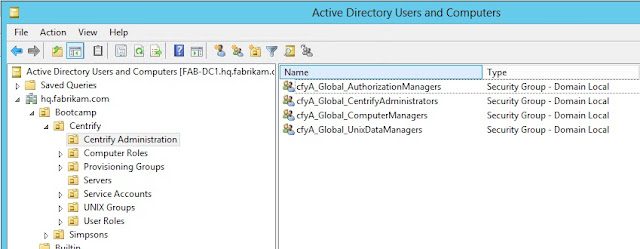

Notice the scope “Security Group – Domain Local” - this means that if you’re in a pure
account/resource model, you will have to add the Global Security groups from
the trusted forest into the corresponding group.
E.g. if you want the Global group Centrify Administrators
from the corp.contoso.com account domain to manage Access/Privileges, I would add them
to the cfyA_Global_* Domain Local groups.


Zone Provisioning
Agent
The Centrify Zone Provisioning agent (ZPA) is a key tool for
Identity and Access provisioning. Some other customers may be using the Centrify
DirectControl SDK, Centrify PowerShell or the TCL-based adedit scripting
language to automate these actions.
When creating the Active Directory Security groups for
Automatic UNIX identity provisioning for users and groups you have think about
the access and trust direction before you decide your strategy.
The main reason is that principals from the trusting forest
can’t see the group memberships of the trusted forest.
If you make the mistake of
- Create a Domain Local group for Identity Provisioning
- Nest a Global Group from the trusted forest
What will happen is that ZPA won’t be able to see any
add/moves or changes to the group and provisioning won’t happen as expected.
Let’s look at this from the agent’s perspective using CLI tools.
Let’s look at this from the agent’s perspective using CLI tools.
I have a system called CEN1 that belongs to a zone in
corp.contoso.com. I will attempt to use
the adquery group command to view the members of a well-known AD group:
[george@cen1 ~]$
adquery group -A "Cert Publishers@corp.contoso.com" | grep members
members:corp.contoso.com/Domain
Controllers/DC1
Let’s now try to see if we can see the same group
memberships from the trusting forest Fabrikam.
[george@cen1 ~]$
adquery group -A "Cert Publishers@hq.fabrikam.com" | grep members
members:hq.fabrikam.com/Domain
Controllers/FAB-DC1
As you can see, this is consistent with the direction of
access principle of AD trusts, and since group memberships are public to
authenticated users from trusted forests, George has no issue seeing this
information.
Let’s repeat the same process from cen2 in Fabrikam.
[jerry.seinfeld@corp.contoso.com@cen2
~]$ adquery group -A "Cert Publishers@hq.fabrikam.com" | grep members
members:hq.fabrikam.com/Domain
Controllers/FAB-DC1
Let’s now try to see if we can see the group memberships
from the same group from Contoso:
[jerry.seinfeld@corp.contoso.com@cen2
~]$ adquery group -A "Cert Publishers@corp.contoso.com" | grep
members
Error: No such group
Cert Publishers@corp.contoso.com
This is where working with Centrify Professional Services yields the best results. They have tools to enable these kinds of scenarios.
The Missing Layer: Automation, Orchestration and Interoperability
It’s very easy to focus on a single product or
infrastructure, it’s also quite common for niche solutions to be closed or
require specialized connectors (or extra investment to facilitate automation,
orchestration and interoperability), however, with Centrify that’s not the
case.
- This can be overlooked however those are the building blocks that make technology and business processes work well. Here are some examples:
- Contoso may be using ServiceNOW to provide workflow, approvals and service management,
there are SN considerations as well as the 4 layers.
For example: When a user requests access (or is removed) to/from a server or group of servers the resulting action is an add/removal from an Active Directory group. Most likely this will be a Domain Local Group in Fabrikam. - If Contoso is using ARCSight for log aggregation, the communication path for agents (syslog, event log) has to be clear, as well as for any additional infrastructure.
- Contoso can also be using Centrify Privilege Service (CPS) to enable Password Management and Session Brokering, perhaps a Cloud Connector may be needed.

Conclusion
In summary, Active Directory Trusts are very powerful, but
unfortunately not well understood.
Designs may vary, but a trust design that has been well researched can
safely extend the boundaries of organizations.
The key concept in an external, non-transitive one-way trust
is that the direction of access is opposite the direction of trust, effectively
protecting the trusted domain;
In addition, network connectivity, name resolution, Active
Directory considerations and Centrify design and tools have to be cohesive for
things to work.
At Centrify, we have this basic test when it comes to
one-way trusts: Show me a Windows
client work as expected. If it does, a
Centrified AD client should work as well.